How to Clean Coway Air Purifier? Step by Step Guide
Your Coway air purifier works around the clock to remove dust, allergens, pet dander, and odors from your indoor air. But here is something most owners overlook: a dirty air purifier can actually make your air quality worse.
Clogged filters force the motor to work harder, increase energy consumption, and let harmful particles pass right back into your rooms. The good news is that cleaning your Coway air purifier is simple, takes about 30 minutes, and can restore up to 90% of lost performance.
Whether you own a Coway Airmega 200M, a Mighty AP 1512HH, or an Airmega 400, this guide covers everything you need. You will learn which filters to wash, which ones to never get wet, how to clean the air quality sensor, and how to reset your filter indicator light.
Key Takeaways
- Always unplug your Coway air purifier before cleaning any part of it. This protects you from electrical hazards and prevents accidental damage to sensors and internal components. Wait at least 10 minutes after turning it off so parts can cool down safely.
- The pre filter is the only filter you should wash with water. Rinse it under lukewarm water every two to four weeks and let it air dry completely before putting it back. A damp pre filter can grow mold and create bigger air quality problems than a dirty one.
- Never wash your HEPA filter. Water destroys the microscopic fiber structure that traps tiny particles. You can gently vacuum both sides of your HEPA filter with a soft brush attachment, but replacement is the only real solution once it gets dirty. Most Coway HEPA filters last about 12 months.
- Clean the air quality sensor every two months using a dry cotton swab. A dusty sensor gives false readings and stops your purifier from adjusting fan speed correctly in auto mode.
- Reset the filter indicator light after every cleaning or replacement. Press and hold the filter reset button for two to three seconds. This restarts the usage timer so your Coway can accurately track filter life going forward.
- Keep a consistent cleaning schedule. Weekly exterior wipes, monthly pre filter washes, and sensor cleanings every two months will keep your unit running at peak performance for years.
Why Regular Cleaning Matters for Your Coway Air Purifier
A clean Coway air purifier does its job far better than a neglected one. Dust and debris build up on every component over time, and this buildup reduces airflow, increases noise, and raises your electricity bill. Your filters become less effective at capturing particles, which means allergens, dust mites, and pet dander stay in your air longer.
Regular cleaning also extends the life of your entire unit. A clogged pre filter forces the HEPA filter to work harder, which shortens its lifespan. You end up replacing expensive filters more often than necessary. Coway recommends cleaning the pre filter every two to four weeks and the air quality sensor every two months for optimal results.
Proper maintenance protects your warranty too. Using damaged or poorly maintained filters can void your coverage. Think of cleaning your Coway like changing the oil in your car. It is a small effort that prevents big, expensive problems down the road.
Gather Your Cleaning Supplies Before You Start
Having everything ready before you begin makes the process faster and safer. You do not want to leave your purifier half disassembled while searching for a cloth or brush.
Here is what you will need: three to four microfiber cloths, a vacuum cleaner with a soft brush attachment, dry cotton swabs, mild dish soap, and a container of lukewarm water. A soft bristled brush or old toothbrush is helpful for stubborn dust in crevices. Some people also keep compressed air on hand for deep cleaning the internal chamber.
Avoid abrasive cleaners, bleach, ammonia, or organic solvents. These chemicals can damage the plastic housing, corrode internal parts, and leave residues that release fumes into your clean air. Stick with mild soap and water for any wet cleaning tasks.
Pros of preparing a dedicated cleaning kit: Saves time, avoids cross contamination from household chemicals, ensures you always have the right tools.
Cons: Small upfront cost, requires a storage spot for the kit.
How to Safely Power Down and Open Your Coway
Start by pressing the power button to turn off your Coway air purifier. Then unplug the power cord from the wall outlet. This step is critical for your safety. Water and electrical components do not mix, and even a small amount of moisture can damage sensors or short circuit the unit.
Wait 10 to 15 minutes to let the internal parts cool. If your model has been running on a high fan setting, the motor and housing may be warm to the touch.
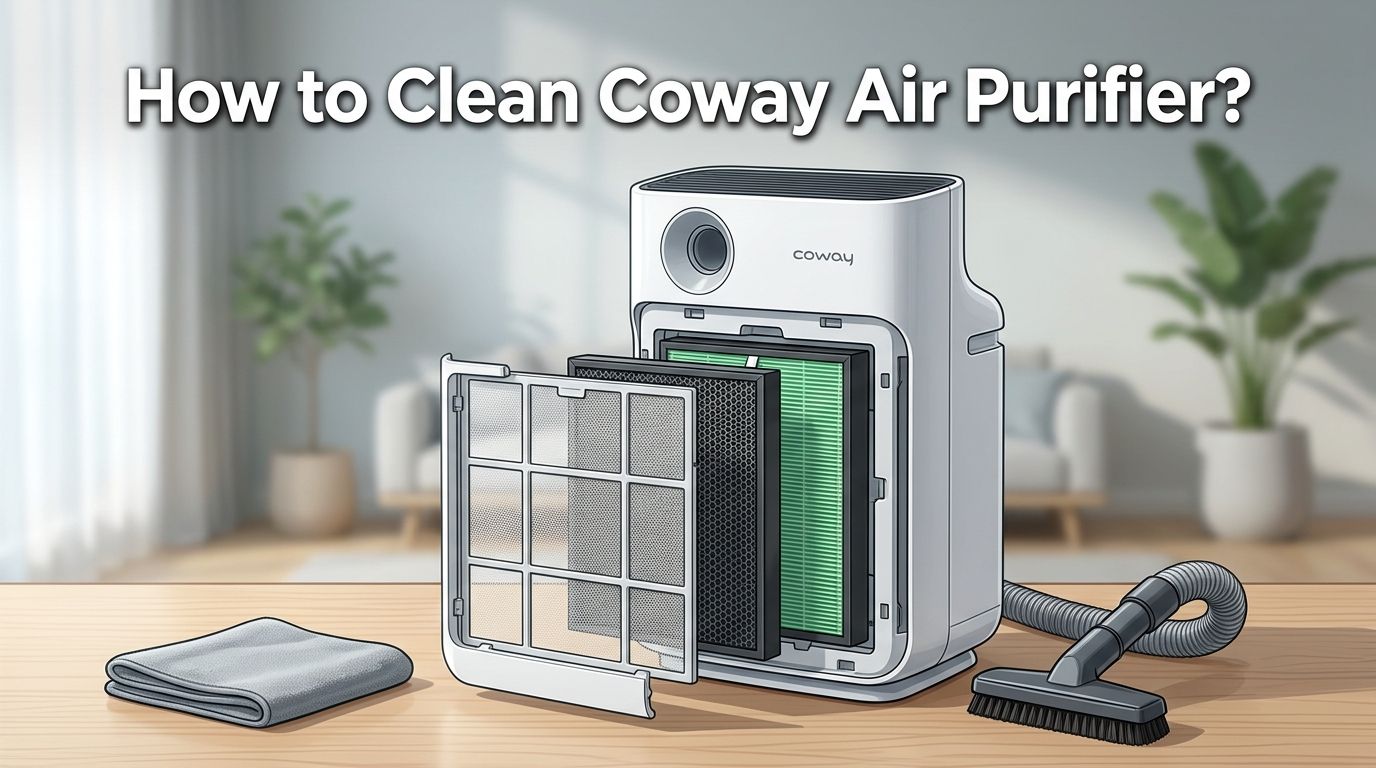
To open most Coway models like the AP 1512HH or Airmega 200M, gently pull the front panel toward you. It releases from clips at the top and bottom. For Airmega 300 and 400 models, the outer covers typically slide off from both sides. Check your specific user manual if you feel resistance. Never force the panel open. Cracking a clip means air can leak around the filters, which reduces filtration performance significantly.
How to Clean the Coway Pre Filter Step by Step
The pre filter is your Coway’s first line of defense. It catches large particles like dust, hair, lint, and pet fur before they reach the HEPA filter. This is the only filter you can and should wash with water.
Remove the pre filter from the inside of the front panel. On most models, you press down on a top clip and slide it out. Hold it up to a light source. If you can barely see light passing through, it is overdue for a wash.
Rinse the pre filter under lukewarm running water. For heavier buildup, apply a small amount of mild dish soap and gently scrub with a soft brush in circular motions. Rinse until the water runs completely clear. Shake off excess water and place it on a clean towel.
Let it air dry for at least four to six hours. Never use a hair dryer or place it in direct sunlight to speed up drying, as heat can warp the mesh. Never reinstall it while damp. Moisture trapped inside your purifier creates a perfect environment for mold growth.
Pros of washing with water: Removes deeply embedded particles, restores full airflow, extends HEPA filter life.
Cons: Requires patience for drying time, risk of mold if reinstalled damp.
How to Maintain the HEPA Filter Without Damaging It
The HEPA filter is the heart of your Coway air purifier. It captures 99.97% of particles as small as 0.3 microns, including pollen, mold spores, and fine dust. You must never wash this filter with water. Moisture permanently destroys the tightly woven fiber structure that makes HEPA filtration work.
What you can do is gently vacuum both sides of the HEPA filter using your vacuum’s soft brush attachment on the lowest suction setting. Use slow, overlapping strokes across the pleated surface. This removes loose surface dust and can extend the filter’s useful life by a few weeks.
Hold the HEPA filter up to a bright light once a month. If light passes through unevenly or the filter looks gray or black throughout, it is time for a replacement. Most Coway HEPA filters need replacement every 12 months under normal conditions. Homes with pets, smokers, or high outdoor pollution may need replacement every 6 to 9 months.
Pros of vacuuming the HEPA filter: Extends filter life slightly, removes loose surface debris, costs nothing.
Cons: Does not restore deep filtration ability, cannot remove embedded particles, may damage filter if suction is too strong.
How to Handle the Activated Carbon Filter
The activated carbon filter (also called the deodorization or odor filter) absorbs gases, smoke, and household odors. This filter is not washable. Water destroys the activated carbon’s porous structure and eliminates its odor absorbing ability permanently.
However, you can refresh its performance with a simple technique. Remove the carbon filter monthly and place it in direct sunlight for two to three hours. Rotate it every 30 minutes for even exposure. UV rays from sunlight help release trapped gas molecules from the carbon surface and partially restore its absorption capacity.
Replace your activated carbon filter every 6 to 12 months depending on your environment. If you cook frequently, have pets, or live near traffic, lean toward the shorter end of that timeline. Signs that your carbon filter is spent include lingering odors despite the purifier running, dark saturation throughout the filter material, and no improvement after sunlight treatment.
Pros of sunlight refreshing: Free, easy, extends useful filter life by several weeks.
Cons: Does not fully restore carbon, requires outdoor space, does not work on overcast days.
How to Clean the Air Quality Sensor on Your Coway
Your Coway’s air quality sensor reads particulate levels in real time and adjusts fan speed automatically. A dusty sensor gives inaccurate readings, which means your purifier may run too slow in polluted air or too fast in clean air. This wastes energy and reduces performance.
Locate the sensor cover on the right side of your unit. On models like the AP 1512HH and Airmega 150, it is a small sliding panel near the bottom. Open the cover gently.
Use a dry cotton swab to wipe the sensor lens, the air inlet, and the air outlet inside the sensor housing. Do not use water, household cleaners, or rubbing alcohol unless your model’s manual specifically allows it. Some newer Airmega models permit a lightly dampened swab, but dry is always the safest choice.
Close the sensor cover firmly. Clean this sensor every two months for accurate air quality monitoring. If your air quality indicator light shows constant red or purple readings even in a clean room, a dirty sensor is almost always the cause.
How to Clean the Exterior and Air Vents
Dust settles on the outside of your Coway just like it does on furniture. This dust can get pulled back into the unit through the air intake vents and clog your filters faster.
Wipe the exterior surfaces with a soft, dry microfiber cloth every week. For sticky spots or fingerprints, use a slightly damp cloth with a tiny drop of mild soap. Wipe dry immediately afterward. Never spray water or cleaning solution directly onto the unit. Liquid can seep through vents and damage internal electronics.
Pay special attention to the air intake grill on the back or sides and the air outlet on top. Use your vacuum’s brush attachment to remove dust from these areas every two weeks. Dust buildup on the outlet grill restricts airflow and forces the fan motor to work harder, increasing noise and reducing efficiency.
Avoid using furniture polish, all purpose spray cleaners, or anything with strong chemicals on your Coway. These can leave a film that releases volatile organic compounds back into your purified air.
How to Reset the Filter Indicator Light After Cleaning
After you clean or replace any filter, you need to tell your Coway that the job is done. The filter indicator light tracks usage time, not actual filter condition. If you do not reset it, the light will keep flashing even with clean or new filters.
On most Coway models including the AP 1512HH and Airmega series, the reset process is simple. Press and hold the filter reset button for two to three seconds. The indicator light will turn off or change color to confirm the reset. On the Airmega 300 and 400, you may need to hold the reset button for up to five seconds until the LED blinks.
Some models have separate indicators for the pre filter, HEPA filter, and carbon filter. Make sure you reset the correct indicator for the filter you cleaned or replaced. Check your user manual for the exact button location and hold time for your specific model.
If the indicator light does not reset, unplug the unit for 30 seconds, plug it back in, and try the reset process again. Persistent indicator issues may signal a sensor malfunction that needs service.
Common Mistakes to Avoid While Cleaning Your Coway
Washing the HEPA filter is the most common and most damaging mistake. Even a quick rinse under water permanently ruins its filtration ability. You will need to buy a replacement immediately if this happens.
Reinstalling a damp pre filter is the second biggest error. Mold can begin growing inside your purifier within 24 to 48 hours in humid conditions. Always verify the pre filter is bone dry before putting it back.
Using harsh chemicals on any part of your Coway can damage plastic components and leave residues. Stick to mild dish soap for the pre filter and dry cloths or cotton swabs for everything else.
Forgetting to check filter orientation during reinstallation is another frequent issue. Coway filters have directional arrows that indicate proper airflow direction. Installing a filter backward reduces efficiency and can let unfiltered air pass through gaps around the edges.
Skipping the sensor cleaning leads to poor auto mode performance. Many owners blame the machine for inconsistent fan speeds when the real problem is a dusty two dollar sensor that takes 30 seconds to clean.
A Simple Cleaning Schedule to Follow
Staying consistent is the real secret to long term Coway performance. Here is a straightforward schedule that covers all the bases without being overwhelming.
Every week: Wipe down the exterior with a dry microfiber cloth. Vacuum the air intake and outlet grills. Check that the air quality indicator responds correctly to changes in your room.
Every two to four weeks: Remove and wash the pre filter with lukewarm water and mild soap. Let it dry completely before reinstalling. Visually inspect the HEPA filter for heavy dust buildup.
Every two months: Clean the air quality sensor with a dry cotton swab. Vacuum both sides of the HEPA filter gently. Place the carbon filter in direct sunlight for two to three hours.
Every 6 to 12 months: Replace the activated carbon filter. Check if the HEPA filter needs replacement by holding it up to light.
Every 12 months: Replace the HEPA filter. Do a full interior deep clean by vacuuming the internal chamber and wiping down interior walls with a barely damp cloth.
Frequently Asked Questions
Can I wash the HEPA filter in my Coway air purifier?
No. You should never wash a Coway HEPA filter with water. Water destroys the microscopic fiber structure that captures fine particles. Once wet, the filter loses its ability to trap 99.97% of airborne particles at 0.3 microns. You can gently vacuum both sides with a soft brush attachment to remove surface dust, but replacement is the only real solution for a dirty HEPA filter. Most models require a new HEPA filter every 12 months under normal use.
How often should I clean my Coway air purifier pre filter?
Coway recommends cleaning the pre filter every two to four weeks. If you have pets, live in a dusty area, or run the purifier during allergy season, increase this to once per week. Rinse it under lukewarm water, scrub gently with mild soap, and let it air dry completely for at least four to six hours before reinstalling it.
Why does my Coway air purifier smell bad after cleaning?
A bad smell after cleaning usually means the pre filter was reinstalled while still damp, which encourages mold growth. It can also mean the activated carbon filter is saturated and needs replacement. Remove all filters, inspect for mold or discoloration, and replace the carbon filter if odors persist. Running the unit on the highest fan speed in an empty room for two hours can also help flush out residual smells.
How do I reset the filter light on my Coway AP 1512HH?
After cleaning or replacing a filter, press and hold the filter reset button for two to three seconds. The indicator light should turn off or change color. If it does not reset, unplug the unit for 30 seconds, reconnect it, and try again. Make sure you are pressing the correct reset button, as some models have separate indicators for the pre filter and HEPA filter.
What happens if I do not clean my Coway air purifier regularly?
Skipping regular maintenance leads to reduced airflow, higher noise levels, increased energy consumption, and significantly lower air quality in your home. Dirty filters cannot trap particles effectively, so allergens and pollutants circulate freely. The motor works harder to push air through clogged filters, which shortens the overall lifespan of your unit and may void your warranty.
Can I use third party filters in my Coway air purifier?
While third party filters are available at lower prices, Coway recommends using genuine filters for optimal performance. Third party options may not fit precisely, which creates gaps that let unfiltered air bypass the filter entirely. They may also use lower quality filtration media that captures fewer particles. Using non genuine filters can potentially affect your warranty coverage as well.

I’m Maya Brown, the voice behind Pure Breeze Vault. I write detailed, honest, and easy-to-follow air purifier reviews to help readers compare features, understand filter technologies, and choose products with confidence. My goal is to make research simpler, clearer, and more practical for anyone improving indoor air quality at home.