Why Is My Desk Air Purifier Sliding Around And Vibrating?
Does your desk air purifier shake and creep across your table? You are not alone. This is a common problem for many small purifiers.
That annoying vibration is not just noisy. It can also slowly damage your device over time.
The good news is that this issue is usually easy to fix. Most causes are simple and mechanical.
In this guide, we will look at why your purifier moves and shakes. We will explore the most common culprits, like unbalanced fan blades and dirt buildup.
In a Nutshell
- Unbalanced fan blades are the top reason your purifier vibrates. Dust or debris on the blades throws off the balance and creates that annoying shake.
- Loose internal parts cause trouble too. Screws, filter frames, and fan housings can loosen over time from normal use.
- Dirt buildup on the blades is sneaky. Even a thin layer of dust can make the fan spin unevenly and rattle.
- Check your placement. Purifiers near walls, corners, or under furniture often vibrate more because airflow gets blocked.
- Avoid spots near heat sources or high humidity areas. These conditions can affect internal parts and worsen shaking.
- A recent filter change might be the culprit. If the filter isn’t seated correctly, it can throw off balance instantly.
- Simple fixes work well here. Unplug the unit, clean the blades, tighten any loose screws, and add anti-vibration feet if needed.
- Most vibration issues are minor and fixable at home. You rarely need a professional for this common problem.
How Your Desk Air Purifier’s Fan System Works
Your desk air purifier relies on a fan system to pull air through filters and push clean air back into your room. Understanding how this system works helps you spot why vibration happens.
The fan motor spins fan blades at high speed. These blades draw dirty air into the unit. The air passes through filters that trap dust, pollen, and other particles. Then the motor pushes the cleaned air out through vents.
The fan blade is the moving part that causes most vibration. When blades spin fast, they need perfect balance. Even a tiny amount of dirt on one blade throws off this balance. The unbalanced blade wobbles as it turns, and that wobble travels through the entire unit to your desk surface.
Your purifier also has internal components that hold everything together. Screws secure the fan housing, filter frames, and motor mounts. Over time, vibration from normal operation loosens these screws gradually. Loose screws rattle and amplify vibration, making the problem worse.
The fan motor itself is mounted inside the unit using rubber or plastic supports. These supports absorb some vibration during operation. If these mounts crack or wear out, vibration transfers directly to the outer casing and then to your desk.
Filter placement matters too. If your filter sits loosely in its frame, it can vibrate independently. A filter that is not secured properly will shake with each rotation of the fan blades.
Regular dust buildup on blades is common. As particles collect on one side of the blade, weight distribution becomes uneven. The motor works harder to spin an unbalanced load, creating more vibration and noise. This is why cleaning fan blades regularly prevents sliding and shaking problems.
Top Causes of Sliding and Vibrating
Your desk air purifier slides and vibrates for several specific reasons. Understanding these causes helps you fix the problem quickly.
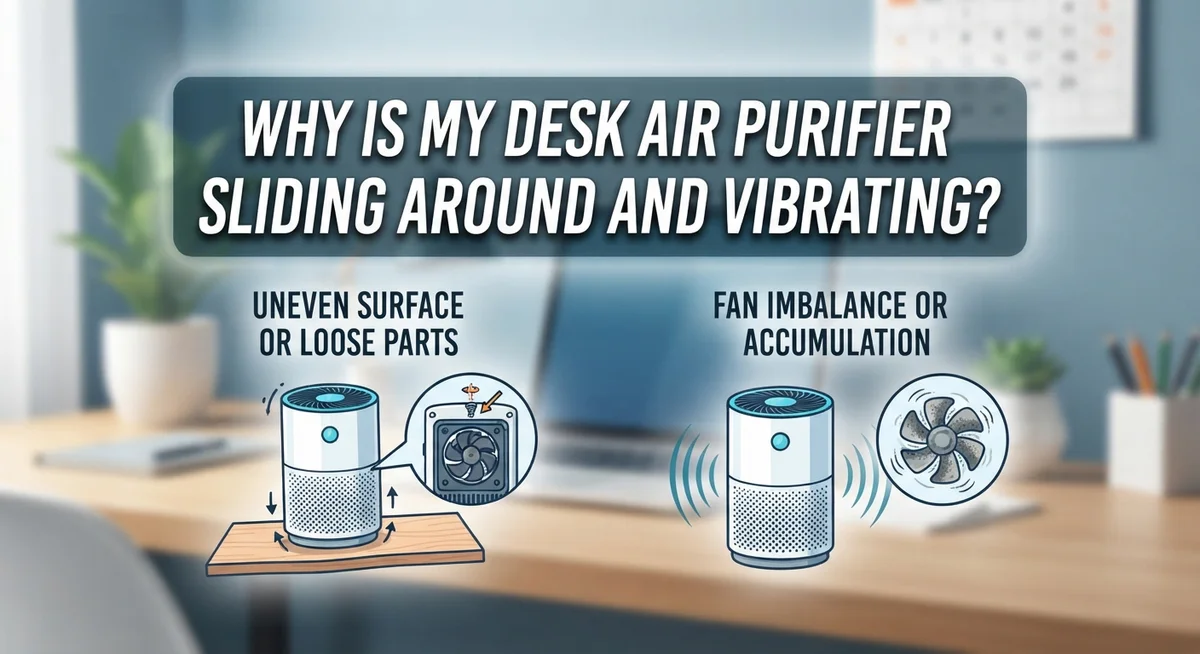
Unbalanced fan blades are the primary culprit. When dust or debris collects on one blade, it creates uneven weight distribution. The fan spins faster, and this imbalance grows worse. You hear buzzing and feel vibration travel through your desk.
Loose internal components develop over time. Screws holding the fan housing gradually loosen from constant vibration. The filter frame may not sit securely in its slot. Even small gaps allow parts to rattle against each other. This creates that annoying shaking sensation.
Dirt accumulation on fan blades is sneaky. It does not take much debris to throw off balance. A thin layer of dust on one side causes noticeable vibration. This buildup happens gradually, so you might not notice until the problem gets worse.
Recent filter changes can trigger vibration too. If your new filter does not fit snugly, it moves during operation. Improperly seated filters vibrate independently from the unit itself.
Placement issues make vibration worse. Positioning your purifier on an unstable surface amplifies movement. Placing it near heat sources or high humidity areas can affect internal components. Avoid spots behind large furniture or in tight corners.
The good news is that most causes are fixable. Start by unplugging your device and inspecting the fan blades for debris. Check all visible screws and tighten them gently. Ensure your filter sits properly in its frame. If vibration continues, consider using anti vibration feet or isolation pads under your purifier. These simple steps usually solve the problem.
Step-by-Step: Diagnosing the Vibration Source
Start by unplugging your air purifier from the outlet. Safety comes first when you inspect any electrical device.
Next, remove the front cover or filter panel. Most desk purifiers have a simple latch or clip system. Look inside and examine the fan blades carefully. Spin the fan by hand gently to feel for resistance or grinding sensations.
Check for visible debris on the blades. Dust, pet hair, and lint collect easily on moving parts. Use a soft brush or cloth to clean the blades thoroughly. Even small particles cause noticeable imbalance.
Now inspect the fan housing and frame. Look for loose screws around the motor area and the unit’s exterior. Use an appropriate screwdriver to tighten any fasteners you find. Don’t over tighten, as this can crack plastic components.
Listen for rattling sounds inside the unit. This indicates loose internal parts like the filter frame or motor mount. Gently shake the purifier and identify where the noise originates.
Check how the filter sits in its frame. A poorly seated filter vibrates independently during operation. Remove and reinstall it, ensuring it clicks or locks firmly into place.
Examine the bottom of your purifier for rubber feet or mounting points. These supports absorb vibration. If they appear cracked or worn, they may need replacement.
Finally, test the purifier on a solid, level surface. Place it on a sturdy desk or table away from edges. An uneven surface amplifies vibration significantly.
Run the purifier for two minutes after reassembly. If vibration persists, the motor itself may be failing and require professional service. Most diagnosis steps reveal the problem quickly and lead to simple fixes you can handle yourself.
How to Clean and Tighten Internal Components
Start by unplugging your air purifier completely. Safety comes first when you open any electrical device.
Locate all visible screws on your unit’s exterior and interior panels. Use a screwdriver that fits properly into each screw head. Loose screws are easy to miss, so check every connection point carefully.
Open your purifier gently and look inside. You’ll see the fan housing, motor mount, and filter frame. These areas collect screws that loosen from vibration over time.
Tighten each screw slowly and steadily. Don’t force them or strip the threads. A snug fit stops vibration without damaging plastic or metal components.
Pay special attention to the fan motor mounting bracket. This bracket holds the motor in place using rubber or plastic isolators. If these isolators feel loose or cracked, tighten the screws holding them to the main frame.
Check the filter frame next. The frame should sit snugly in its slot with no wiggle room. Tighten any screws that secure the frame to the housing.
Inspect the fan blade assembly carefully. Look for any bent or loose blades. Tighten the center bolt or screw that holds the blade to the motor shaft.
Clean away any dust or debris from internal components. Dust buildup adds weight unevenly and causes imbalance. Use a soft brush or dry cloth to remove particles gently.
Reassemble your purifier in reverse order. Plug it in and run it for a few minutes. Listen for rattling or buzzing sounds that indicate remaining loose parts.
If vibration persists after tightening everything, the motor itself may need professional service. Most internal component issues resolve with simple tightening and cleaning.
Using Isolation Feet and Stabilizing Placement
Isolation feet are rubber or foam pads that sit under your air purifier. They absorb vibration energy before it travels to your desk surface. This simple addition often reduces sliding and noise significantly.
Why isolation feet work is straightforward. Your purifier vibrates during normal operation. Without protection, those vibrations transfer directly into your desk, making the unit slide around. Isolation feet act as a buffer between the vibrating device and your work surface.
When selecting isolation feet, look for materials designed specifically for vibration dampening. Rubber compounds work well because they absorb motion rather than reflect it. Foam options are also effective. The key is choosing feet that match your purifier’s weight and size.
Installation is easy. Simply place one isolation foot under each corner of your air purifier’s base. Make sure the feet sit flat and level. Your purifier should feel stable and secure after placement.
Stabilizing placement matters too. Position your air purifier on a solid, level desk surface. Avoid placing it on glass, plastic, or thin materials that amplify vibration. A sturdy wooden or metal desk works best. Keep the unit away from desk edges where vibration can cause it to tip.
Ensure nothing blocks the air intake or output vents. Obstructed airflow forces your motor to work harder, increasing vibration. Leave at least six inches of clear space around your purifier.
Check your desk surface regularly. Even with isolation feet, periodically verify that your purifier remains centered and stable. Over time, slight shifts can occur. A quick adjustment keeps everything functioning smoothly and quietly.
Placement Mistakes That Make Vibration Worse
Placement mistakes can make your air purifier vibrate much more than it should. Understanding where NOT to put your device helps reduce unnecessary movement and noise.
Positioning your purifier behind large furniture creates major problems. Sofas, cabinets, and bookshelves block airflow and force your device to work harder. This extra effort causes the motor to strain and vibrate more intensely. Your purifier also slides around more when it’s fighting against restricted air pathways.
Placing your device near walls or in corners is another common mistake. Walls reflect vibrations back toward your desk surface, making the shaking feel worse. Corners trap sound and vibration, amplifying the problem. Your purifier needs at least six inches of clearance on all sides for proper function.
Avoid positioning your air purifier below hanging furniture or shelves. Objects overhead can fall if vibration loosens them, and they also trap vibrating air around your device. This creates feedback loops that make everything worse.
Heat sources create additional problems. Placing your purifier near radiators, vents, or direct sunlight forces it to work harder and vibrate more. Electronics nearby can also interfere with motor operation, causing irregular vibrations.
High humidity areas like bathrooms or kitchens are problematic too. Moisture damages internal components and causes loose parts to rattle more. Your purifier’s motor has to compensate for moisture exposure, which increases vibration.
The best placement strategy is simple. Put your air purifier on a sturdy, level desk away from walls and furniture. Keep it away from heat, moisture, and other electronics. This setup minimizes vibration at the source and prevents your device from sliding around unexpectedly.
When Vibration Signals a Filter or Mechanical Problem
When your desk air purifier vibrates and slides, the problem often points to internal mechanical issues rather than placement alone. Understanding these signals helps you fix the problem before it worsens.
Loose fan blades are the most common culprit. Over time, the fan blade assembly can become unbalanced or detach slightly from its housing. This creates intense vibration that travels through your entire unit. Dirt buildup on the blades makes this worse because it shifts the blade’s weight unevenly.
Loose internal screws and components deteriorate gradually during normal operation. The fan motor mounting bracket, filter frame, and housing panels all vibrate slightly with each cycle. After weeks or months, these connections loosen further. Eventually, the vibration becomes noticeable and the unit starts sliding across your desk.
Filter problems also trigger vibration. When you install a new filter incorrectly, it may sit unevenly in its frame. An improperly secured filter causes the airflow to become unbalanced. This forces your fan to work harder and vibrate more intensely.
To identify a mechanical problem, listen carefully to the vibration pattern. Buzzing or rattling noises indicate loose parts inside. Grinding sounds suggest the fan blade may be rubbing against the housing.
The solution involves unplugging your unit and inspecting the fan blade assembly for debris or damage. Tighten all accessible screws inside the unit. Check that your filter sits flush in its frame with no gaps. Clean away dust from the fan blades using a soft brush.
If vibration persists after these steps, the motor itself may have internal damage. This typically requires professional service since motor repairs involve complex internal components. Most mechanical issues resolve with proper tightening and cleaning, though.
Preventing Future Sliding and Vibration Issues
Preventing future sliding and vibration issues requires a proactive approach. Regular maintenance is your first line of defense against these problems.
Clean your air purifier every two weeks. Dust and debris accumulate on fan blades and internal components. This buildup causes imbalance over time. Simply unplug the unit and gently wipe the exterior vents with a soft cloth. Check your filter monthly and replace it according to the manufacturer’s timeline.
Tighten all accessible screws regularly. Many air purifiers allow you to access the fan housing with a basic screwdriver. Every three months, do a quick inspection and tighten any loose fasteners. This simple step prevents vibration before it starts.
Inspect your desk surface for stability. A wobbly desk amplifies vibration problems significantly. Make sure your desk is level and sits firmly on the floor without rocking.
Establish a placement routine. Keep your air purifier away from high traffic areas where it gets bumped or moved frequently. Position it on a stable, flat surface away from edges. Avoid placing it near electronics or devices that generate heat.
Check the air purifier’s feet or base quarterly. These contact points wear down gradually. If rubber feet look compressed or damaged, replacement is needed to restore proper contact with your desk.
Keep vibration dampening materials nearby. Even with perfect maintenance, having anti vibration pads available helps when needed. Store them with your air purifier so you can deploy them quickly if vibration returns.
Document your maintenance schedule. Write down when you clean, tighten screws, and replace filters. This record helps you spot patterns and catch problems early before vibration becomes noticeable.
Final Thoughts
Your desk air purifier does not have to slide and vibrate forever. Most causes are simple to fix once you know where to look.
Placement matters just as much as maintenance. A stable, flat surface away from walls and clutter makes a big difference right away.
Regular cleaning keeps your unit running smoothly. Dust and debris on fan blades create imbalance, and imbalance leads to noise and movement.
Loose screws and worn components are normal after months of use. Checking them every few weeks helps you catch problems early.
Filters need proper installation too. A filter that sits unevenly can throw off airflow and cause shaking you might blame on the fan.
Anti vibration pads offer a quick fix when other solutions take time. They absorb movement and protect your desk surface from scratches.
Think of your air purifier like any small appliance. It needs occasional attention to work well and stay quiet.
Small steps add up over time. A quick wipe down, a screwdriver check, and smart placement solve most vibration issues without any repairs.
If problems persist after trying these fixes, the unit may have deeper mechanical wear. At that point, professional repair or replacement becomes the practical choice.
Listening to your purifier helps you understand it better. Unusual sounds often signal something specific, whether that’s dirt, loose parts, or an uneven filter.
Your goal is simple. Keep the unit clean, secure its parts, and place it wisely.
Follow these habits and your desk air purifier will run quieter and stay put. A little routine care goes a long way toward peaceful, effective air cleaning every day.
Frequently Asked Questions
Why does my desk air purifier vibrate so much?
Vibration usually comes from an unbalanced fan blade or loose internal parts. When your unit runs, the fan spins rapidly. If debris sticks to the blades or screws loosen over time, the fan wobbles instead of spinning smoothly.
Dust buildup is the most common culprit. Even small particles can throw off the blade balance. Loose screws in the fan housing also cause buzzing and shaking.
How do I stop my air purifier from sliding around?
Your desk surface matters more than you think. A smooth, polished desk makes sliding worse. Check if your unit has rubber feet or a base designed to grip surfaces.
Anti vibration pads work well. These small accessories sit between your purifier and the desk. They absorb movement and keep the unit in place.
Make sure your desk itself is stable too. A wobbly desk amplifies vibration from the purifier.
Can a new filter cause vibration?
Yes. When you install a new filter incorrectly, it may sit unevenly in its frame. This creates an imbalance that travels through the whole unit.
Always check that your filter sits flush and secure. Push it firmly into place until you hear or feel it click. Misaligned filters often cause more noise than mechanical problems.
What should I do first to fix the problem?
Unplug your purifier immediately. Open the unit and inspect the fan blade for dust or debris. Wipe the blades clean with a soft cloth.
Next, look for loose screws around the fan housing and internal components. Tighten them gently with a basic screwdriver. This fixes most vibration issues within minutes.

I’m Maya Brown, the voice behind Pure Breeze Vault. I write detailed, honest, and easy-to-follow air purifier reviews to help readers compare features, understand filter technologies, and choose products with confidence. My goal is to make research simpler, clearer, and more practical for anyone improving indoor air quality at home.